How to Calculate IRR on a TI-84: irr( Function Guide (2026)
How to calculate IRR on the TI-84 Plus using the irr( function: cash flow entry, frequency argument, and ERR:NO SIGN CHG fixes.

The TI-84 Plus is standard equipment in high school and college finance courses, but almost every IRR guide assumes you have a BA II Plus, an HP 12C, or a spreadsheet. The TI-84 Plus handles IRR natively through its Finance app using a function called irr(. The syntax looks nothing like what you find in Excel, and the most common error comes from one specific keying mistake: entering CF0 as a positive number instead of negative.
The function passes all cash flows in a single expression rather than stepping through registers one at a time. The IRR Calculator runs the same computation online and is useful for cross-checking your keystrokes before relying on a result. This guide covers how to access the function, the complete syntax, a worked example with verification, the optional frequency argument for longer series, and where TI-84 output diverges from Excel.
Where IRR Lives on the TI-84 Plus: Finance App and irr( Function#
The irr( function is not in the standard math or statistics menus. It is in the Finance app.
To access it:
- Press
APPS - Scroll to
Finance(usually near the top of the list) and pressENTER - Scroll to
8:irr(and pressENTER
The text irr( appears on the home screen, ready for input. On the TI-84 Plus CE, Finance appears as a standalone application rather than a native function set. The navigation is the same on every TI-84 model.
The Finance menu contains two functions you will use together: 7:npv( and 8:irr(. After computing IRR, you can run npv( at the result to verify it: if the net present value comes out near zero, the IRR is confirmed.
Entering curly braces:
Cash flow lists in irr( require curly braces, not parentheses or square brackets. On the TI-84 keypad:
{=2nd+((above the 8 key)}=2nd+)(above the 9 key)
Using square brackets [ ] calls matrix elements and produces ERR:DATA TYPE. Using parentheses instead of curly braces triggers the same error. The curly brace requirement is what causes most first-time users to get an error before they can even test the calculation.
The HP 12C and BA II Plus use cash flow registers you fill one at a time and step through sequentially. The TI-84 takes all values in a single expression. For register-based workflows on those calculators, the IRR on a Financial Calculator guide covers both in detail.
irr( Syntax, Arguments, and Entry Errors#
The complete syntax is:
irr(CF0, {C01, C02, C03, ...})
CF0 is the initial outflow, entered as a negative number. It represents money paid at the start of the investment. It must be negative. A positive CF0 is the single most common input error, and it always produces ERR:NO SIGN CHG.
The cash flow list {C01, C02, ...} contains all subsequent cash flows in order by period, separated by commas and wrapped in curly braces. Positive values are money received. Negative values within the list represent additional outflows during the holding period.
Return value: The function outputs IRR as a percentage. An output of 14.96 means 14.96% per period. This is different from Excel, which returns a decimal.
ERR:NO SIGN CHG means the calculator could not find a rate that makes the NPV of the series equal zero. Two causes:
- CF0 is positive:
irr(10000,{3000,4000})must beirr(-10000,{3000,4000}). - All values in the cash flow list are also negative, meaning no return ever occurs. The error is mathematically correct in that case: no IRR exists for a series with no positive cash flows.
ERR:DATA TYPE means an argument is in the wrong format:
- Missing curly braces:
irr(-10000,3000,4000)must beirr(-10000,{3000,4000}) - Square brackets instead of curly braces: use
{3000,4000}not[3000,4000] - Currency symbols in the list:
{$3000,4000}must be{3000,4000}
The equation the calculator is iteratively solving sets the net present value of all cash flows equal to zero and finds the discount rate that satisfies it. The How to Calculate Internal Rate of Return guide covers the mathematical structure in full, including why some cash flow patterns produce more than one valid IRR.
Worked Example: Calculating IRR on a Four-Year Investment#
This example uses a clean four-year series to show the complete entry sequence and expected output.
Cash flows:
- Year 0: $10,000 invested
- Year 1: $3,000 received
- Year 2: $4,000 received
- Year 3: $4,000 received
- Year 4: $3,000 received
Entry on the TI-84:
Press APPS → Finance → 8:irr(, then type:
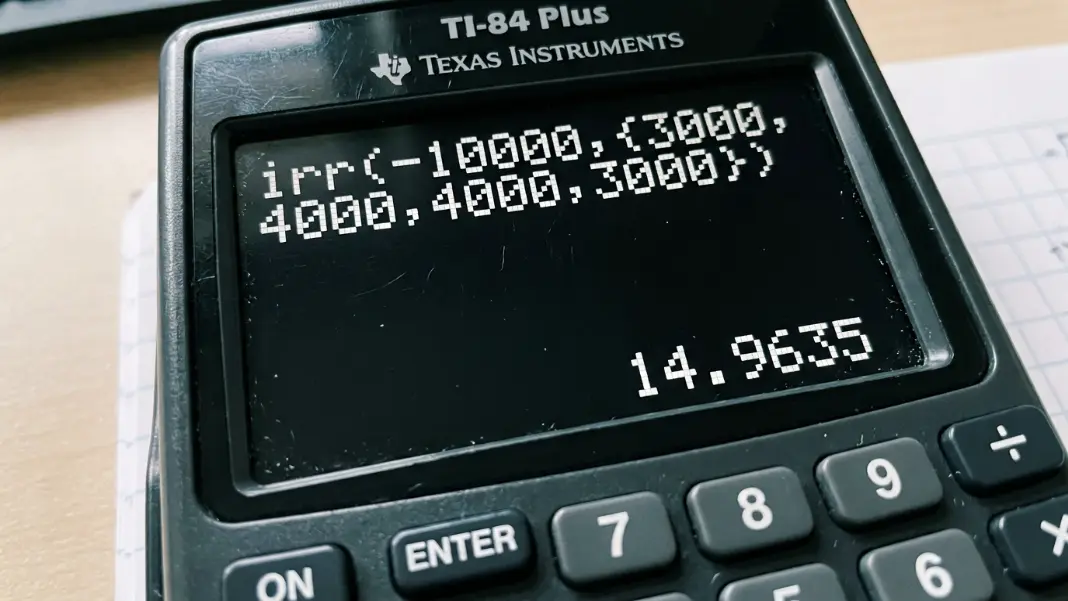
irr(-10000,{3000,4000,4000,3000})
Press ENTER.
Output: 14.9635...
The IRR is approximately 14.96%. This means the $10,000 investment produces a return equivalent to 14.96% compounded annually across the four-year hold.
Confirming with npv(:
Press APPS → Finance → 7:npv( and enter:
npv(14.9635,-10000,{3000,4000,4000,3000})
The output should be close to zero, typically a small rounding residual under 0.01. A near-zero result confirms the IRR is correct.
How the entry price controls the result:
Holding the future cash flows constant and changing only CF0 shows how much entry price affects IRR:
| Initial Investment | IRR |
|---|---|
| -$8,000 | 24.0% |
| -$10,000 | 14.96% |
| -$12,000 | 7.7% |
| -$14,000 | 2.4% |
The same future cash flows ($3K, $4K, $4K, $3K) produce a 24% IRR when purchased at $8,000 and a 2% IRR when purchased at $14,000. Entry price is the most controllable variable in any IRR calculation, which is why buy-side negotiations in real estate and private equity focus on it more than on any single year's projected cash flow.
Handling Repeated Cash Flows: The Frequency Argument#
When the same cash flow amount appears in multiple consecutive periods, irr( accepts an optional third argument: a frequency list that specifies how many periods each value repeats.
Syntax with frequency:
irr(CF0, {C01, C02}, {F01, F02})
F01 is the number of consecutive periods C01 repeats. F02 is the number of consecutive periods C02 repeats. Both lists must contain the same number of elements.
Example:
A $20,000 investment returns $5,000 per year for 3 years, then $8,000 per year for 2 years.
Without the frequency argument, you type every period explicitly:
irr(-20000,{5000,5000,5000,8000,8000})
With the frequency argument:
irr(-20000,{5000,8000},{3,2})
Both return approximately 13.72% IRR. The frequency version is shorter and reduces keying errors when the series runs 8 or more periods.
Real estate application:
A rental property purchased with $150,000 in equity generates $12,000 per year in after-debt-service cash flow for 7 years. In year 8, the property is sold. The terminal cash flow is the final year's $12,000 in operating cash flow plus $168,000 in net sale proceeds, totaling $180,000.
irr(-150000,{12000,180000},{7,1})
The frequency argument {7,1} applies $12,000 for 7 consecutive periods and $180,000 once. This returns approximately 9.8% levered IRR.
The frequency argument also handles bonds and annuities: equal coupon payments for many periods followed by a par value at maturity can be expressed as two values with their respective frequencies rather than a long explicit list.
The How to Calculate IRR in Excel guide covers the IRR() and XIRR() functions in spreadsheet context, which handle the same calculations and also support irregular time intervals that the TI-84 irr( function cannot process.
When TI-84 IRR Differs From Excel and Financial Calculator Results#
The TI-84 irr(, Excel IRR(), and financial calculator IRR routines all solve the same equation. But three situations produce output differences worth knowing before you compare results across tools.
Return value format:
The TI-84 returns IRR as a percentage: an output of 12.5 means 12.5%. Excel IRR() returns a decimal: 0.125. If you copy a TI-84 result into an Excel formula cell without converting it, any downstream NPV or comparison formula will be off by a factor of 100. Either format the Excel cell as a percentage before entering the TI-84 result, or divide the TI-84 output by 100 first.
Convergence and multiple valid IRRs:
A cash flow series that changes sign more than once (for example: negative, positive, negative across three positions) can have more than one mathematically valid IRR. The TI-84 uses a fixed iteration starting point and returns whichever root it finds first.
If you enter a series with two sign changes and get a result that seems too high or too low, run npv( at the returned rate. If NPV is near zero, that is a valid IRR. Whether it is the economically useful one requires context. Try computing IRR on subsets of the cash flow to identify which root aligns with the actual investment period.
Irregular time periods:
The irr( function treats each position in the cash flow list as one period of equal length. If cash flows arrive on irregular dates (a real estate sale 18 months into a 12-month hold cycle, a payment on day 200 instead of day 365), the TI-84 result will not reflect the actual timing.
Excel handles this through XIRR(), which takes actual date values alongside cash flows and adjusts the discounting for the true number of days between each cash flow. For standard annual or quarterly series on exact period boundaries, both the TI-84 and Excel produce the same result. For anything with non-anniversary timing, use XIRR or the date-adjusted version in a financial calculator.
For a quick check against any TI-84 result, the IRR Calculator accepts a full cash flow series and returns the rate without requiring keypad navigation through the Finance app.
Press APPS, select Finance, then choose 8:irr(. Enter the initial investment as a negative number, a comma, then all subsequent cash flows in curly braces separated by commas. For a $10,000 investment returning $3,000, $4,000, $4,000, $3,000 over four years, the full entry is irr(-10000,{3000,4000,4000,3000}). Press ENTER. The output is approximately 14.96, meaning 14.96% IRR. Curly braces are entered using 2nd + ( for { and 2nd + ) for }.
The irr( function is at position 8 in the Finance app. Press APPS, scroll to Finance, press ENTER, then scroll to 8:irr(. The Finance app also contains npv( at position 7. After computing IRR, run npv( at the returned rate to confirm: if the net present value is close to zero, the IRR is correct. The Finance app appears in the APPS list on every TI-84 model, including the TI-84 Plus CE.
ERR:NO SIGN CHG means the irr( function could not find a rate that makes the net present value of the cash flow series equal zero. The most common cause is entering CF0 as a positive number instead of negative. The initial investment must be negative: irr(-10000,{...}) not irr(10000,{...}). The error also appears when all cash flows have the same sign, meaning the series has no positive return. No fix exists in that case because no IRR can exist for a series without sign changes.
The optional third argument specifies how many consecutive periods each cash flow repeats. The syntax is irr(CF0, {C01, C02}, {F01, F02}) where F01 is the number of periods C01 repeats and F02 is the number of periods C02 repeats. For a $20,000 investment returning $5,000 for 3 years then $8,000 for 2 years, the entry is irr(-20000,{5000,8000},{3,2}) instead of irr(-20000,{5000,5000,5000,8000,8000}). Both produce the same result of approximately 13.72%.
Yes. Enter the equity invested at acquisition as a negative CF0, annual after-debt-service cash flows as the list values, and combine the final year's operating income with net sale proceeds as the terminal entry. For a $150,000 equity position generating $12,000 per year for 7 years with a $180,000 terminal cash flow in year 8, the entry is irr(-150000,{12000,180000},{7,1}). This returns approximately 9.8% levered IRR. Make sure to use after-debt-service cash flows, not NOI, for the levered calculation.
The TI-84 irr( returns the result as a percentage: 14.96 means 14.96%. Excel IRR() returns a decimal: 0.1496 must be formatted as a percentage to display correctly. Both solve the same underlying equation. Excel also offers XIRR(), which handles cash flows on irregular dates; the TI-84 irr( function assumes evenly-spaced periods and cannot replicate XIRR results for non-anniversary timing. For standard annual or quarterly series on exact period boundaries, both tools produce identical results.
Written by
Hassaan Rasheed
Web Developer & Content Researcher
Hassaan builds calculators and writes source-linked guides across the site's subject areas. Calculator methods and reference data are documented in each guide so readers can verify the underlying sources.
About the author and methods